
Free for training and recruitment
Online quizzes that send, remind and grade themselves.
Kwizto sends each participant a personal link, reminds those who haven't started, computes the score and delivers the result at closing. You see who has answered, and who hasn't, on a single screen.
Free up to 100 participants per month, no credit card. Your participants don't need an account.
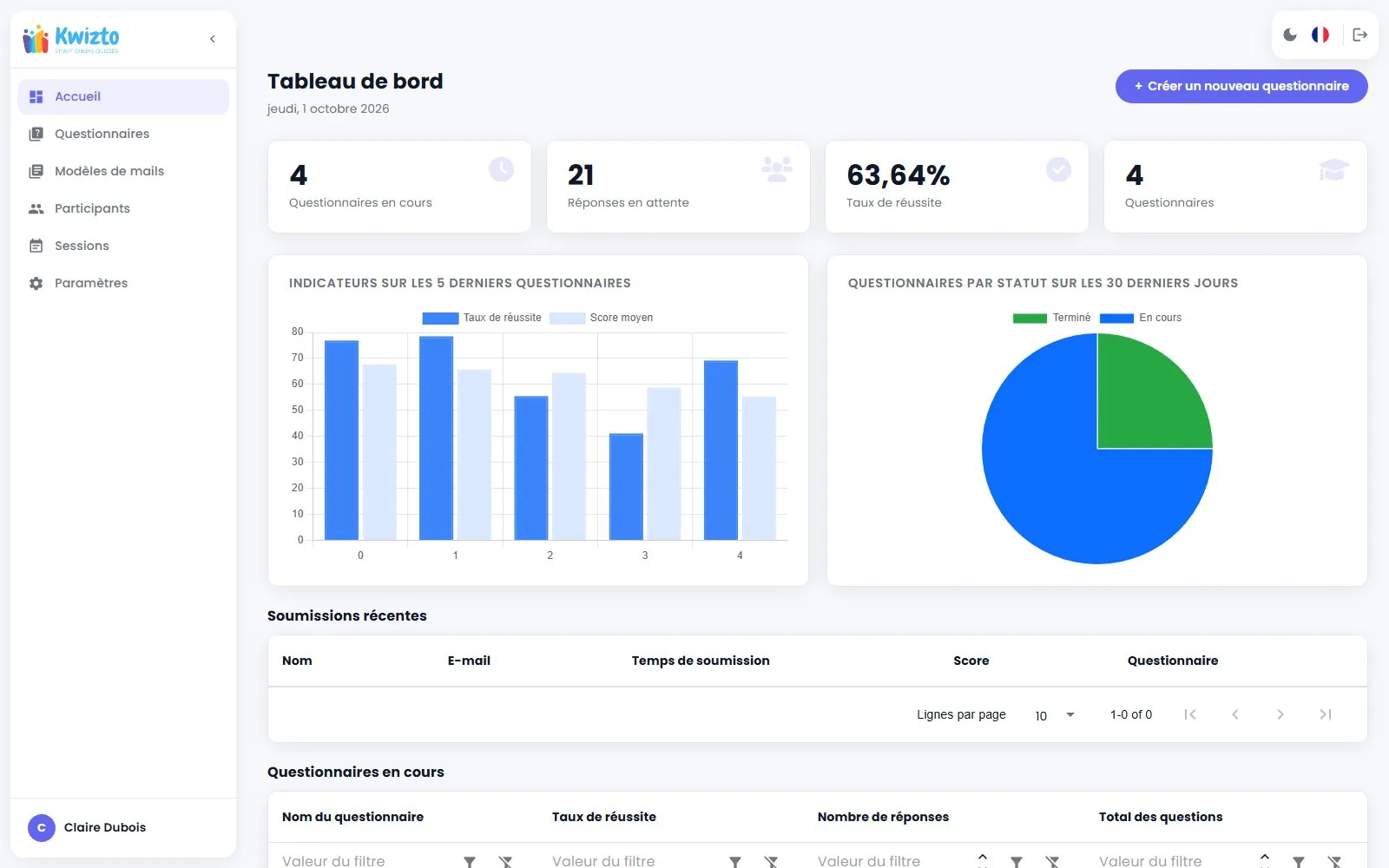
Kwizto at a glance
Kwizto is an online quiz platform for training organizations, recruitment and internal teams. It emails each participant a personal link, reminds them automatically until closing, grades answers on submission and delivers the results. Free up to 100 participants per month.
- Price
- Free up to 100 participants per month; Pro at €29 excl. VAT per month, billed annually
- Question types
- Single choice, multiple choice, free text, file upload, audio answer
- Participants
- No account to create: a personal link by email
- Grading
- Automatic on submission, with a configurable passing score
- CRM integration
- Cirrus Shield, optional and included in both plans
- Hosting and languages
- Data in France (OVHcloud); interface in French and English
Why Kwizto
A form collects answers. Kwizto runs an assessment.
Sharing a link is enough for a survey. To assess a group of trainees or candidates, the work starts after sending: reminding, tracking, grading, delivering. Kwizto does it for you.
Example: a quiz open from Monday to Friday, reminder every 48 hours
Monday 9am
Invitation
12 personal links sent
Wednesday 9am
Reminder
4 reminded, the others have started
Friday 9am
Reminder
Only 1 latecomer reminded
Friday 6pm
Closing
11 out of 12 finished
Friday 6pm
Results
Everyone receives their score
Your only action: create the quiz. Kwizto handles the rest.
| Step | Without Kwizto | With Kwizto |
|---|---|---|
| Invite | You share a common link and don't know who received it. | Each participant receives a personal link when the quiz opens. |
| Remind | You write to those who haven't answered. | Automatic reminders until closing, stopped as soon as the participant starts. |
| Track | You cross-check answers against your list. | Status per person: not started, in progress, completed. |
| Grade | You compute scores or build a grading scheme. | Score computed on submission, passing score, success rate. |
| Deliver | You send results one by one. | Everyone receives their result by email at closing, overall or detailed. |
| Assess orally | You organize a call or ask for a file by email. | Audio answer recorded in the browser, or an attached document. |
| Archive | You re-enter scores in your CRM. | Excel or CSV export; score, status and date flow back into Cirrus Shield. |
Features
Everything is included in the free plan.
5 question types
Single choice, multiple choice, free text, file upload and audio answer. A reference document can accompany each question.
Invitations, reminders, results
Three emails scheduled on the quiz calendar, editable and savable as templates.
Instant grading
Score computed on submission, configurable passing score, result display of your choice: none, overall or detailed.
Dashboards
Success rate, average score, average duration, unfinished quizzes. Excel or CSV export.
Participants and sessions
CSV import, grouping by training session, a page per participant with all their results.
Time limit and anti copy-paste
Set a completion time in minutes and block copy, paste and right-click during the attempt.
Three steps.
Create the quiz
Questions, grading scheme, opening and closing dates.
Assign participants
Each one receives a personal link by email, no account to create.
Follow the results
In real time, until the results are sent automatically.
Use cases
Built for those who assess people.
Training organizations
Entry placement, end-of-session assessment, ungraded satisfaction questionnaire. Results sorted by session.
Assessment and collecting feedback are part of the quality criteria of article R6316-1 of the French Labour Code.
Recruitment
Technical test before the interview, deferred interview with audio answers, CV or case study upload. Reminders go out on their own.
Internal teams
Onboarding of newcomers, security or compliance awareness, product knowledge checks.
CRM integration
Your results land on the contact record.
With Cirrus Shield, send a quiz from the record of a contact, a lead or any object that has an email. Score, status and completion date flow back to the record. No double entry.
Included at no extra cost in both plans. Kwizto also works on its own.
Coming soon
In the works, and free too.
AI generation
A complete quiz from a topic or from your training material.
Ready-made templates
Placement, instant feedback, recruitment tests, onboarding.
Random order
Questions and answers shuffled for each participant.
Certificate of achievement
PDF generated when the passing score is reached.
Pricing
Free
AvailableTo get started and assess small groups
€0
No credit card, no time limit
Create a free account- 1 administrator
- Unlimited questionnaires
- Unlimited questions per questionnaire
- 100 participants per month*
Included in the Free plan
- 5 question types: single choice, multiple choice, free text, file, audio
- Automatic grading and passing score
- Ungraded questionnaires: survey, satisfaction, interview
- Invitations, reminders and results sent automatically
- Sending from your own SMTP, Gmail or Hotmail
- Reusable email templates
- Time-limited attempts and anti copy-paste
- Training sessions and CSV import of participants
- Dashboards, per-participant tracking, Excel and CSV export
- Cirrus Shield integration
- Data hosted in France (OVHcloud)
Pro
For training organizations and HR teams
€29 excl. VAT / month
Billed annually
Go Pro- Unlimited questionnaires
- Unlimited questions per questionnaire
- Unlimited participants
Everything in Free, plus
- No participant limit
- Emails without the Kwizto mention
Included in both plans, at no extra cost
Cirrus Shield integration
Send a quiz from the record of a contact or a lead and find its score, status and completion date in the CRM.
* Free plan: a participant is a person invited to a questionnaire, whether or not they answer, or a person who answers through the public link; a person invited to two questionnaires counts twice. The quota resets on the 1st of each month and applies whatever the email sending mode, including your own SMTP. Quota reached: people already invited can still answer, and your results remain viewable and exportable.
FAQ
Frequently asked questions about online quizzes
Getting started
5
How do I create an online quiz for free?
Create a free Kwizto account, no credit card. Add your questions, set an opening and closing date, publish, then assign your participants: each one receives their invitation by email.
Is Kwizto really free?
Yes, up to 100 participants per month and no credit card. Questionnaires and questions are unlimited, and every quiz feature is included: grading, automatic emails, time limit, dashboards and export. The Pro plan, at €29 excl. VAT per month billed annually, removes the participant limit and the Kwizto mention from emails. The Cirrus Shield integration is included in both plans.
Do participants need to create an account?
No. Each participant receives a unique, personal link by email that opens the quiz directly.
What is the difference between Kwizto and an online form?
A form collects answers. Kwizto also handles everything around it: participant list, scheduled invitation, reminders until closing, status per person, passing score and sending the result to everyone.
Where is Kwizto's data hosted?
In France, at OVHcloud. Quizzes, participants and their answers are hosted on servers located in France.
Sending and reminders
4
How do I email a quiz to a list of participants?
Import your list as CSV or add participants one by one, select them, then choose the quiz to send. The invitation goes out when the quiz opens, with a personal link for each person.
Can participants be reminded automatically?
Yes. Set a reminder frequency in hours: Kwizto reminds until closing and stops the reminders as soon as a participant starts the quiz.
Can I use my own sending email?
Yes: your SMTP server, or your Gmail or Hotmail account connected through OAuth. Invitations, reminders and results then go out from your address.
How do I know who hasn't answered?
Each quiz shows every participant's status: not started, in progress or completed. The home page gathers the pending answers across all your quizzes.
Grading and results
4
How do I grade a quiz automatically?
Mark the correct answer(s) and their points: the score of single or multiple choice questions is computed on submission. Free-text answers, files and audio recordings are reviewed in the participant's detail.
Can I set a passing score?
Yes. You confirm it at publication; it cannot exceed the total score. The quiz's success rate is computed from it.
Do participants see their result?
You choose: no score, the score, or the score detailed question by question. You can also email each person their result at closing.
How do I export a quiz's results?
From the quiz page, as Excel or CSV. With the Cirrus Shield integration, the score, status and completion date also flow back to the contact record.
Use cases
7
How do I assess what trainees learned?
Group your trainees by session, send a graded quiz at the end of the training and an ungraded satisfaction questionnaire. Assessment and collecting feedback are part of the quality criteria of article R6316-1 of the French Labour Code.
Can I run an online recruitment test?
Yes. Combine choice questions, free-text answers, file upload and audio answers recorded in the browser, useful for a deferred interview.
Which question types are available?
Single choice, multiple choice, free text, file upload (25 MB by default) and audio answer. Each question can include a reference document: image, audio, video or file.
Can I create an ungraded questionnaire?
Yes. Turn off the "Graded" option for a survey, a satisfaction poll or an interview.
How do I limit cheating during a quiz?
Turn on the anti copy-paste option: it blocks copy, paste and right-click during the attempt. It is a deterrent, not a guarantee.
Can I limit a quiz's duration?
Yes. Enter a completion time in minutes in the questionnaire settings. Participants' actual average duration is then shown in the quiz tracking.
Do I need Cirrus Shield to use Kwizto?
No. Kwizto works on its own. The Cirrus Shield integration, included at no extra cost in both plans, lets you send a quiz from a contact record and find the result there.
Send your first quiz today.
Free up to 100 participants per month, no credit card.
Create a free account